Smartsheet Integrates With Claude Sheets, Making It Easy to Start Projects in Claude and Launch Workflows Across Teams with Smartsheet
New Send to Smartsheet feature moves work started in Claude into Smartsheet, where the Execution Graph connects it to
Press Release Disclaimer: This is a press release distributed through the XPR Media network. It has not been independently verified by our newsroom.


Smartsheet, the AI-powered enterprise work management platform, today announced a new integration with Claude Sheets, the new spreadsheet artifact in Claude from Anthropic, now in beta. With the new Send to Smartsheet feature, people who build a tracker or plan in Claude can move it into Smartsheet in a few clicks. There they can put it to work with their team, connected to the plans, projects, people and systems their organization already runs on.
This press release features multimedia. View the full release here: https://www.businesswire.com/news/home/20261110763156/en/
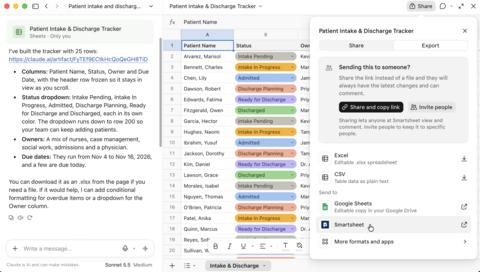
With the new Send to Smartsheet feature, people who build a tracker or plan in Claude can move it into Smartsheet in a few clicks.
More and more work now begins in a conversation with Claude, and the Smartsheet MCP connector for Claude puts the entire power of the Smartsheet platform into play for users. Now with Claude Sheets, a person can think through a launch plan, a project tracker or a budget, and shape with the familiarity of a spreadsheet. Once a plan is ready, it often needs to reach more of the organization: teammates who own deliverables, leaders who need to know how their organization is executing, and systems that need the same information. Send to Smartsheet makes that move directly from Claude, so people can go from an idea to work their team is acting on without re-entering any data.
In Smartsheet, each row can have an owner and a due date, and the work can be shared with everyone who delivers it, including colleagues who don’t use Claude. Even people without a Smartsheet account can take part: automated update and approval requests arrive by email, and their answers flow straight back into the sheet. Automations send reminders and route approvals. Dashboards show status as it changes, and the sheet links to the projects and goals it supports. Through the Smartsheet connector, Claude stays connected to the work and gains more context once the sheet is tied to a plan or project. People can keep asking it to add formulas, build dashboards or check on progress.
“Claude Sheets is a fast, easy way to get a first draft done, and Smartsheet is where your whole team picks it up from there,” said Drew Garner, chief AI officer at Smartsheet. “You describe the work and Claude builds the sheet, fast and remarkably well. Bring it into Smartsheet, and it plugs into your team’s workflow – with owners, discussions, dashboards, automations, and scheduled agents, and people reviewing and approving along the way. Getting serious work done requires context, teamwork, governance and security. Pairing the familiarity of a spreadsheet and the power of Claude with the context of the Smartsheet Execution Graph means many people and many agents can work from one shared system.”
What’s New: Send to Smartsheet
Take a marketing lead preparing a product launch. She works through the plan with Claude, shapes it into a tracker in Claude Sheets and sends it to Smartsheet. There, she assigns tasks to a dozen teammates across product, sales and creative, and adds the tracker to the dashboard her VP reviews each week. An outside agency confirms its delivery dates by email through an automated update request, without ever logging in. Later that week, she asks Claude which tasks are falling behind, and Claude answers from the live data in Smartsheet.
The result is one continuous path from idea to execution. People think and build with Claude, then move the work into Smartsheet, where teams manage it alongside everything else and connect it to the plan and context behind it. Claude stays connected to the work the whole way. Work that arrives from Claude follows the same permissions and approvals as everything else in Smartsheet. People and AI agents can see and change only what they are allowed to.
Available at launch in the U.S., EU and Australia through the Smartsheet connector for Claude, Send to Smartsheet lets people:
- Move a Claude Sheet into Smartsheet using their own Smartsheet login. Each send creates a new sheet in the workspace the person chooses, with real dates, numbers and dropdowns carried over, so the sheet is ready to work in. Sheets of hundreds of rows arrive complete and in order.
- Keep building in the same conversation. After the send, Claude can add formulas, formatting and hierarchy, then use Smartsheet AI to build automations, dashboards and reports, when the person asks. Through the Smartsheet connector, Claude can see the sheet and the plan or project it is connected to, so it has more context to work with.
- Connect it to everything else. Once in Smartsheet, work can be assigned, scheduled, linked to a project or portfolio, tied into the systems a team already uses, and shared with people who never opened Claude, using no-cost Contributor seats.
Built on the Existing Smartsheet Connector for Claude
Send to Smartsheet extends the Smartsheet connector for Claude, built on the Smartsheet MCP Server, which already brings live work, dashboards, discussions and workflows into the conversation. Smartsheet connects 277 billion rows of work data each month. Since launching its MCP Server in March 2026, Smartsheet has seen AI actions grow more than 700%, and Smartsheet Agentic Workflows run on Anthropic models today.
Work that arrives from Claude stays under the same governance as everything else in Smartsheet. AI agents can see and change only what the person they work for can, and Smartsheet recently earned ISO/IEC 42001 certification for responsible AI management. Customer data stays with the customer and inside their permissions. Smartsheet’s agreements with its third-party AI providers prohibit them from training foundation models on customer content.
Where It Connects: What Customers Get From the Execution Graph
Once in Smartsheet, a sheet from Claude is no longer a standalone file. It becomes part of the Execution Graph, which maps how work connects across the business, from tasks to projects to programs to strategic goals. Built on 20 years of workflow intelligence from millions of projects, the Execution Graph knows an organization’s project history, the way its work gets done, how its teams work together, and the systems and data they rely on every day. And that context compounds: each discussion, dashboard, automation and agent added around the sheet gives the next one more to work from, so the work becomes more valuable the longer it runs in Smartsheet. For customers, that means:
- Work that has an owner and a place in the plan. A tracker that began in a conversation is tied to the project, program and goal it serves, so people can see who is responsible and how it affects other work.
- AI agents that work with real context. Smartsheet’s Creation Agent turns a plain-language goal into sheets, dashboards, reports and automations. The Data Quality Agent flags issues by severity, and Agentic Workflows turn a plain-language request into a recurring task, so a sheet originating from Claude can be checked for data issues or summarized each week on a schedule the team sets.
- Earlier warning on problems. With work connected, leaders can spot an overloaded team or a weak link between projects before it becomes a problem, and vsActual, unveiled at ENGAGE 2026, shows whether work is on track against priorities.
Availability
Send to Smartsheet is available at launch through the Smartsheet connector for Claude in the U.S., EU and Australia. People choose a destination workspace for each send. Learn more about Send to Smartsheet.
About Smartsheet
Smartsheet is an AI-powered enterprise work management platform. Teams use it to plan programs, track work across groups, automate routine processes and give leaders real-time visibility into how work is progressing. It sits between spreadsheets, which are flexible but hard to govern, and rigid project tools built for a single team. Smartsheet is used by millions of people at organizations, including the majority of the Fortune 500, with enterprise-grade security, administration and compliance controls. To learn more about Smartsheet, visit www.smartsheet.com.
View source version on businesswire.com: https://www.businesswire.com/news/home/20261110763156/en/
Media gallery